
How to Play Night Camp
Updated
Play Night Camp in the browser. The official Play button goes to the site's play path, which redirects to the web client at the play host. That is the only play path the official site and Play Rise both point at.
The path that actually opens the game
On the homepage, Play and the large play control both use the play path. That address answers with a redirect to the web client. The client shell is a short page titled Night Camp. Its visible line is "กำลังเข้าเกม Night Camp…", the Thai for entering the game, plus a link if the redirect does not continue.
On 28 November 2026 that shell's Last-Modified header was 11:08 UTC, and the page pointed at a folder named game-20261128-1729. Keep that name in its own box. It is the folder the shell loaded that morning. It is not patch 0.3.146, and it is not the wiki label SS2 · v0.2. Open Beta separates those clocks, and Patch Notes is the news series.
Tip: Bookmark the official site, not a reposted client link. The shell folder name changes when they ship a new client build, and a saved deep link can point at yesterday's folder.
Store buttons do not download anything
The homepage draws four store buttons: App Store, Google Play, Windows, and macOS. Each one is an empty link. They do not open Apple, Google, Microsoft, or a desktop installer. The official wiki's Download control and its Login control are marked as not ready. Play Rise's English copy says "Play now in your browser," which matches the web path and does not add a native store.
A Steam store search for "Night Camp" on 28 November 2026 returned other camp games, not this one. A search for "NightCamp" returned nothing. US and Thai iTunes software searches returned camping, night-light, and other apps, not a Play Rise or Tile Map release of Night Camp. Patch 0.3.146 does say that iPhone and iPad can scroll lists inside windows with a finger. Read that as a note about the browser on those devices. It is not an App Store listing. Patch 0.3.138 says the English client can take a card payment in US dollars, and the Thai client pays as before, with tax invoices in Thai baht either way. That is an in-game payment method, not a store page.
The old pre-registration path redirects to the homepage. It is not a signup event you can still join. The publisher's Night Camp page still shows a waitlist form next to the play button. Use the play button.
A first session, from the notes that exist
- Open the official site and press Play. Wait through the shell. If it stalls, use the "press here" link on that same shell.
- Sign up when the client asks. Patch 0.3.146 reopened new ID registration: email, then the 6-digit code sent to that email. Accounts that enter with email must verify the email within 3 days of the first login after that update. The prompt appears on its own.
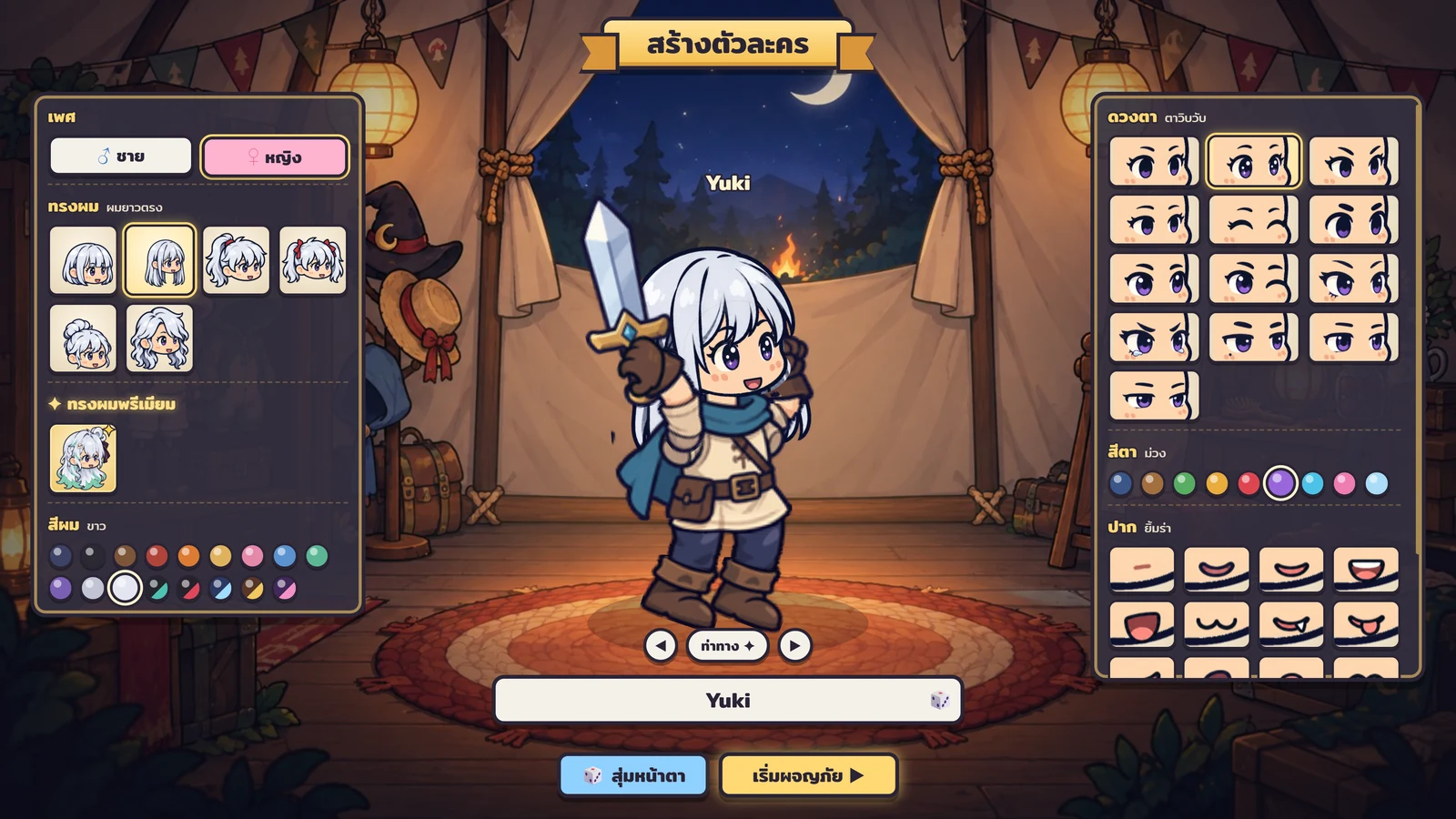
- Create a character. The homepage screenshot above is the kind of screen you get: name, hair, face, and colors, inside a tent. A character created less than 24 hours ago cannot be deleted, per that same patch.
- Pick a starting job once the client offers one. The homepage roles are on Classes. The five starters are the jobs the marketing site actually describes.
- Leave the player market alone until the character is level 31 or the account has Premium, and until the email is verified. That gate is Accounts and Market. The older "list from level 20" line is from 22 November and is not the rule to follow on its own.
Official Links has the site, the client, the wiki, the news list, and the social accounts in one place. Life Skills is the camp side of the game once you are in: wood, ore, crops, fish, and cooking, plus the Season 2 names on the official life-skills page.
What the official pages leave out
There is no published browser matrix, no minimum spec sheet, and no promise that every system in the wiki is turned on in the 28 November client. The official pages confirm a web client in Open Beta. They do not publish a device list. If a button on the homepage has an empty link, treat it as empty.
Verdict: Use the official Play path, create the character, and read patch 0.3.146 before you trade or delete anything. Ignore the four store buttons until they stop being empty links.
FAQ
Can I download Night Camp for Windows or Mac?
Not from the official homepage. Those buttons do not lead to a file or a store. The confirmed client is the browser one.
Does the game run on a phone?
The homepage does not offer an Android or iOS app. Patch 0.3.146 mentions finger scrolling in windows on iPhone and iPad, which fits the web client. It does not add a store link.
What is game-20261128-1729?
The folder name in the web shell on 28 November 2026. It is a client stamp. Patch numbers stay in the 0.3 series on the news list, and the wiki stays on v0.2.
Why does the site look Thai if the wiki is English?
The marketing homepage checked on 28 November 2026 is Thai. The wiki UI is English and has a Thai switch. The English marketing paths for the homepage and the news list return 404. English legal pages are the exception.
Sources: Night Camp official site, Night Camp web client shell, Night Camp news, official Night Camp wiki